You’ve spent good money on your gaming setup. Don’t put it on a shaky folding table.
A solid gaming desk does more than hold your gear. It keeps monitors stable, manages messy cables, and helps you stay comfortable during long sessions.
Today’s best gaming desks focus on ergonomics and smart design, with features like electric sit-stand controls, built-in cable management, and spacious layouts.
Whether you need a compact setup or a large L-shaped command center, there’s a desk built to match your space and play style.
Contents
Best Gaming Desks to Upgrade Your Battlestation
A hollow particle-board desk might look fine, but the moment you try to clamp a heavy dual-monitor arm to it, the wood will snap.
You need to look at frame materials, motor strength for standing desks, and how well the manufacturer actually thought out cable routing. Here are the desks that survive the reality of PC gaming.
1. Arozzi Arena Gaming Desk
Type: Standard Wide Gaming Desk

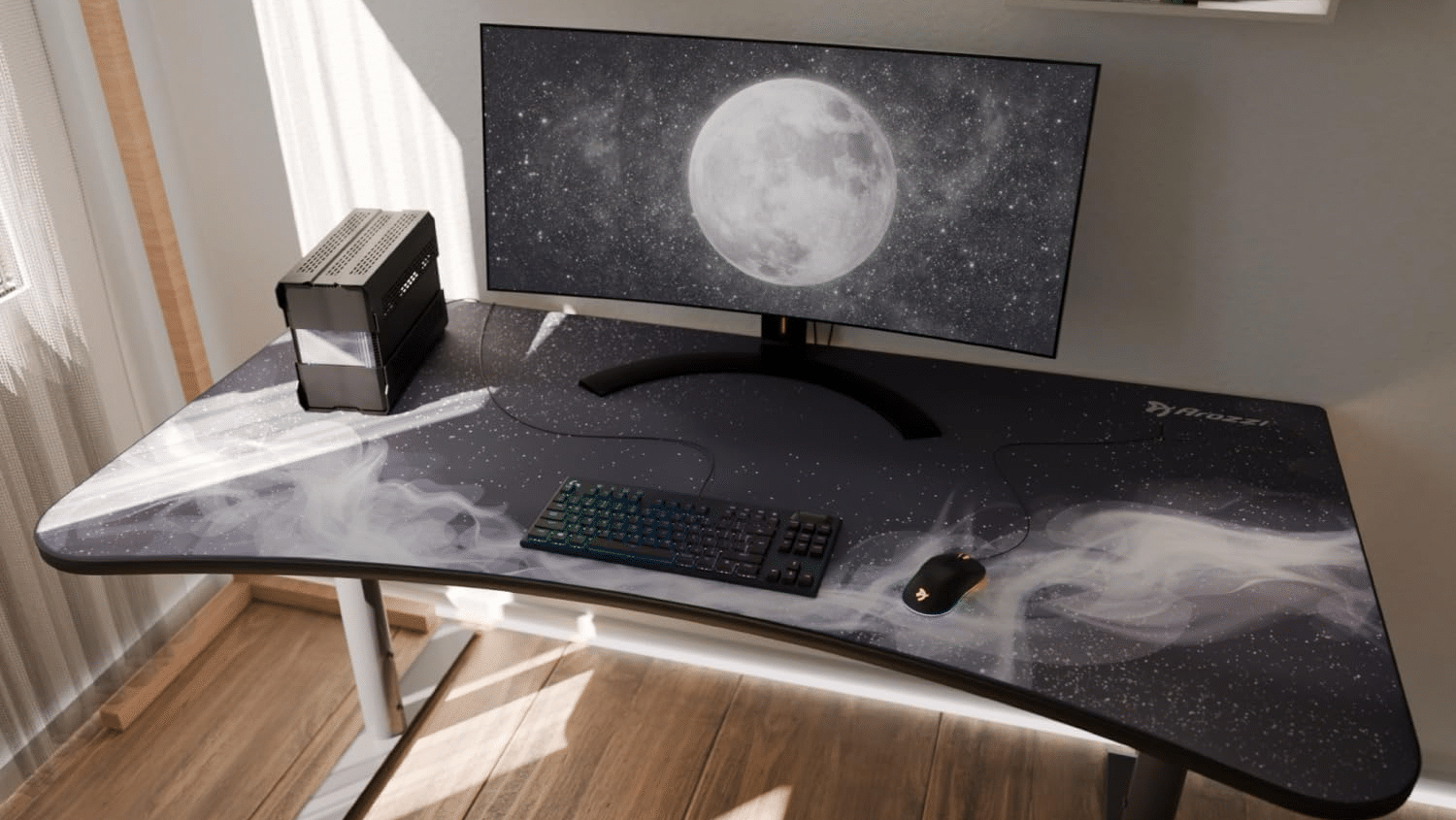
Sometimes you don’t need motors; you just need a massive surface area. The Arozzi Arena is a cult classic for a reason. The entire 14-square-foot surface of the desk is covered by a custom, water-resistant microfiber mousepad. It features a slight curve at the front, allowing you to sit “inside” the desk and reach the far corners easily.
Dimensions: 63″ L x 32″ W
Weight Capacity: 176 lbs
Materials: MDF board, steel legs, microfiber surface
Key Features: Full-surface mousepad, three cable management cutouts, under-desk netting
Pros:
- The edge-to-edge mousepad feels fantastic for low-DPI shooter players.
- Easily swallows three 27-inch monitors side-by-side.
- Deep 32-inch surface keeps screens at a healthy distance from your eyes.
Cons:
- The mousepad will eventually get dirty and needs to be machine-washed.
- Manual height adjustment requires unscrewing bolts on the legs.
Best Use Case: Competitive FPS players who need massive mouse-swipe space and multi-monitor setups.
Verdict: A traditional, rock-solid desk that prioritizes surface area and mouse control above all else.
2. Secretlab Magnus Pro XL
Type: Electric Sit-Stand

If there is a gold standard for modern battlestations, the Secretlab Magnus Pro XL is it. Secretlab looked at the worst part of PC building—cable management—and engineered a masterpiece around it.
The desk features a massive drop-in tray spanning the entire back edge, but the real magic is the power column. A single power cable runs from the wall directly into the desk leg, providing electricity to an internal power strip inside the cable tray. Your PC and monitors plug into the desk itself, meaning zero cables dangle down to the floor when the desk raises and lowers.
Dimensions: 70″ L x 31.5″ W
Weight Capacity: 264 lbs
Materials: Solid steel chassis, MDF core, magnetic faux-leather mat
Key Features: Integrated power column, magnetic cable anchors, full-length cable tray
Pros:
- The best cable management system ever designed for a desk.
- Incredibly stable at maximum standing height.
- The magnetic desk mat feels luxurious and is easy to swap.
Cons:
- Exceptionally expensive, especially once you add accessories.
- The metal lip on the back can interfere with some third-party monitor arm clamps.
Best Use Case: Premium battlestations, streamers, and anyone who despises visible cables.
Verdict: It costs a fortune, but it completely solves cable management. It’s the ultimate hybrid work-and-play desk.
3. FLEXISPOT E6G CyberX
Type: Heavy-Duty Electric Sit-Stand

FlexiSpot is famous in the ergonomic office space, and the CyberX brings that heavy-duty motor reliability into the gaming aesthetic. Equipped with dual motors and a carbon-fiber textured top, this desk is built for the player who has a massive, water-cooled PC tower and multiple monitors sitting directly on the desktop.
Dimensions: Up to 72″ wide options
Weight Capacity: 355 lbs
Materials: Carbon fiber textured MDF, industrial-grade steel frame
Key Features: Dual-motor lift, memory preset keypad, anti-collision tech
Pros:
- Massive 355 lb weight capacity handles anything you can throw at it.
- Zero noticeable wobble, even when fully elevated.
- Smooth, quiet dual motors.
Cons:
- Cable management tray is basic compared to Secretlab.
- The carbon-fiber texture means you absolutely need a mousepad for precise tracking.
Best Use Case: Heavy setups, ultrawide monitor users, and gamers who put their heavy PC tower on the desk.
Verdict: A powerhouse standing desk. You are paying for raw motor strength and uncompromising stability.
4. EUREKA ERGONOMIC Captain GIP-P60
Type: Standard Gaming Desk

If you want a desk that arrives with everything you need right out of the box, the Eureka Ergonomic 60-inch model is a fantastic mid-range option. It skips the expensive motors but bundles in a ton of quality-of-life accessories, including a tailored mousepad, a cup holder, a dual-headset hook, and a controller stand with USB ports.
Dimensions: 60″ L x 23.6″ W
Weight Capacity: 500 lbs (static)
Materials: EPA-certified particle board, carbon steel frame
Key Features: Included accessory bundle, dual cable routing holes, tailored mousepad
Pros:
- Fantastic value for the size and included accessories.
- Extremely high static weight capacity for a non-motorized desk.
- Wide enough for two large monitors and a PC tower.
Cons:
- The desktop ships in two pieces, leaving a faint seam down the middle.
- 23.6-inch depth is a bit shallow if you use large monitor stands instead of clamp arms.
Best Use Case: First-time setup builders and gamers who want a wide desk without spending standing-desk money.
Verdict: It’s affordable, surprisingly sturdy, and gives you all the essential organization accessories right out of the box.
5. AODK L-Shaped Gaming Desk
Type: L-Shaped Corner Desk
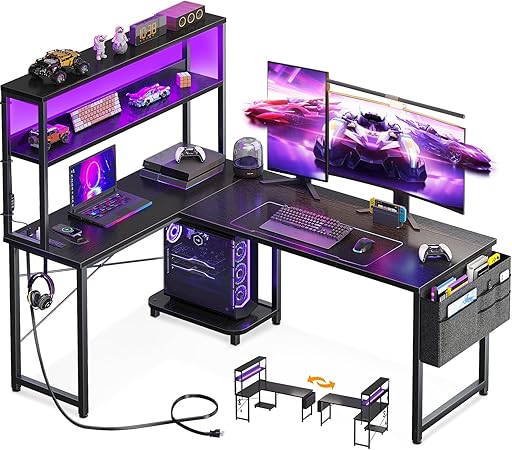
Trying to maximize a tight bedroom or a small apartment? An L-shaped desk is the easiest way to double your workspace without eating up the center of the room. AODK’s model is highly rated because it builds a power strip directly into the desktop and features a raised monitor shelf, which frees up the main surface for your keyboard, mouse, and snacks.
Dimensions: 53″ L (both sides) x 18.9″ W
Weight Capacity: ~150 lbs
Materials: Engineered wood, metal frame
Key Features: Built-in power outlet/USB ports, LED light strip, reversible layout, under-desk storage shelves
Pros:
- Incredible use of corner space; highly functional layout.
- Built-in outlets save you from crawling under the desk to plug in phone chargers.
- Very affordable price point.
Cons:
- The wood is relatively thin; do not attempt to clamp a heavy dual-monitor arm to it.
- LED strip feels a bit cheap.
Best Use Case: Small rooms, budget setups, and gamers who need space for schoolwork or a second laptop.
Verdict: The ultimate space-saver. It won’t hold up a custom water-cooled rig, but for a standard setup, it offers unbeatable real estate for the price.
6. ErGear EGESD5B
Type: Budget Electric Sit-Stand

Standing desks used to be a luxury item, but ErGear has brought the price down to earth. While it doesn’t have the massive lift capacity of the FlexiSpot or the premium cable tray of the Secretlab, it offers smooth electric height adjustment and memory presets for the cost of a standard wooden table.
Dimensions: 55″ L x 28″ W
Weight Capacity: 176 lbs
Materials: Particle board, steel legs
Key Features: Single motor lift, 3 memory presets, headphone hooks
Pros:
- Unbeatable price for a motorized sit-stand desk.
- 55-inch width is a great sweet spot for dual-monitor setups.
- Motor is surprisingly quiet.
Cons:
- Desktop comes in two split pieces (requires the mousepad to cover the seam).
- Noticeable monitor wobble if you type aggressively at maximum standing height.
Best Use Case: Gamers on a strict budget who want the health benefits of a standing desk.
Verdict: It makes a few compromises in desktop thickness and high-end stability, but the value proposition is absolutely staggering.
How to Choose the Best Gaming Desk
Before you hit buy, take a hard look at your actual setup. Buying the wrong desk usually leads to cracked particle board, sagging centers, or monitors sitting way too close to your face.
Desk Depth is Crucial
Length is important, but depth dictates comfort. If a desk is only 20 inches deep, a 27-inch monitor is going to sit uncomfortably close to your eyes, and you won’t have room for a large keyboard and a sweeping mousepad. Aim for at least 24 to 30 inches of depth for a comfortable viewing distance.
Standing Desks vs. Fixed Height
If you work from home during the day and game at night, an electric standing desk is highly recommended. Prolonged sitting tightens the hip flexors and leads to lower back pain. Look for desks with memory presets so you can find your exact ergonomic height for both sitting and standing without having to guess every time.
Monitor Arm Compatibility
If you plan to use a C-clamp monitor arm to hold your screens, you need a desk with a solid core (MDF, solid wood, or thick steel). Cheap desks made with hollow honeycomb cores will literally crush and snap under the concentrated pressure of a heavy monitor arm clamp.
The Cable Management Reality
A desk with a simple hole cut in the top is not “cable management.” If you want a clean setup, you need a desk with an under-desk raceway or tray to hold heavy power bricks and surge protectors. If your chosen desk doesn’t come with one, you’ll need to buy an aftermarket wire rack and screw it into the bottom.
Comparison Table
Model
Type
Width
Lift Capacity
Best Feature
Secretlab Magnus Pro XL
Sit-Stand
70″
264 lbs
Hidden Power Column
FLEXISPOT CyberX
Sit-Stand
Up to 72″
355 lbs
Massive Stability
Arozzi Arena
Standard
63″
176 lbs
Full-Desk Mousepad
Eureka Captain GIP
Standard
60″
500 lbs
Included Accessories
AODK L-Shaped
Corner
53″ x 53″
150 lbs
Space Optimization
ErGear EGESD5B
Sit-Stand
55″
176 lbs
Budget Electric Lift
Final Verdict: Which One Should You Buy?
If you have the budget, buy the Secretlab Magnus Pro XL. The magnetic cable management and hidden power routing make it feel like a piece of high-end machinery rather than just a table.
If you want the health benefits of a standing desk but can’t stomach a massive price tag, the ErGear EGESD5B gets the job done for a fraction of the cost.
Finally, if you just want a rock-solid, massive surface for throwing your mouse around in competitive shooters, the Arozzi Arena remains a legendary choice for pure gaming real estate.
Frequently Asked Questions (FAQ)
Are gaming desks worth it?
Yes, but mainly because of the weight capacities and cable management. Standard office desks are rarely designed to hold the weight of two heavy monitors, a clamp mount, and a 40-pound custom PC tower.
What size gaming desk should I buy?
- Single Monitor: 40 to 48 inches wide.
- Dual Monitors: 55 to 60 inches wide.
- Triple Monitors or Ultrawide + PC on desk: 63 to 72 inches wide.
Are gaming desks stable enough for heavy PCs?
High-end desks with solid steel frames (like Secretlab or FlexiSpot) easily hold 250+ pounds and are perfectly safe for heavy rigs. Avoid putting heavy water-cooled PCs on budget L-shaped desks made of thin particle board.
Can gaming desks support monitor arms?
Usually, yes. But always check the desk’s thickness and material. If the desk is less than 0.6 inches thick or has a hollow core (like some cheap IKEA tabletops), the clamp will break the wood. Solid MDF, bamboo, or solid wood is required.
Are RGB gaming desks worth it?
Built-in RGB is a nice touch, but it shouldn’t be the reason you buy a desk. You can always add a $20 smart LED light strip to the back of a high-quality, sturdy desk. Prioritize build quality first, lighting second.